ONLYOFFICE Doc Editors
With ONLYOFFICE™ Editors, you have complete control on your documents without loosing any formatting unlike online web-based HTML editors.
FlinkISO · Free Open Source QMS
You can manage your processes by adding a process documents as usual from QC Documents section. While adding QC Document, you must mark the document as Process from the document type radio button. Once added, details from the document will also be added to the Process table. You can then update the process details with additional information like, input and output processes, process is application to whom, who is the process owner etc. Some of this information like process owner & applicable to will be already available based on the values added in QD Document table. You can edit these values as per your requirement.
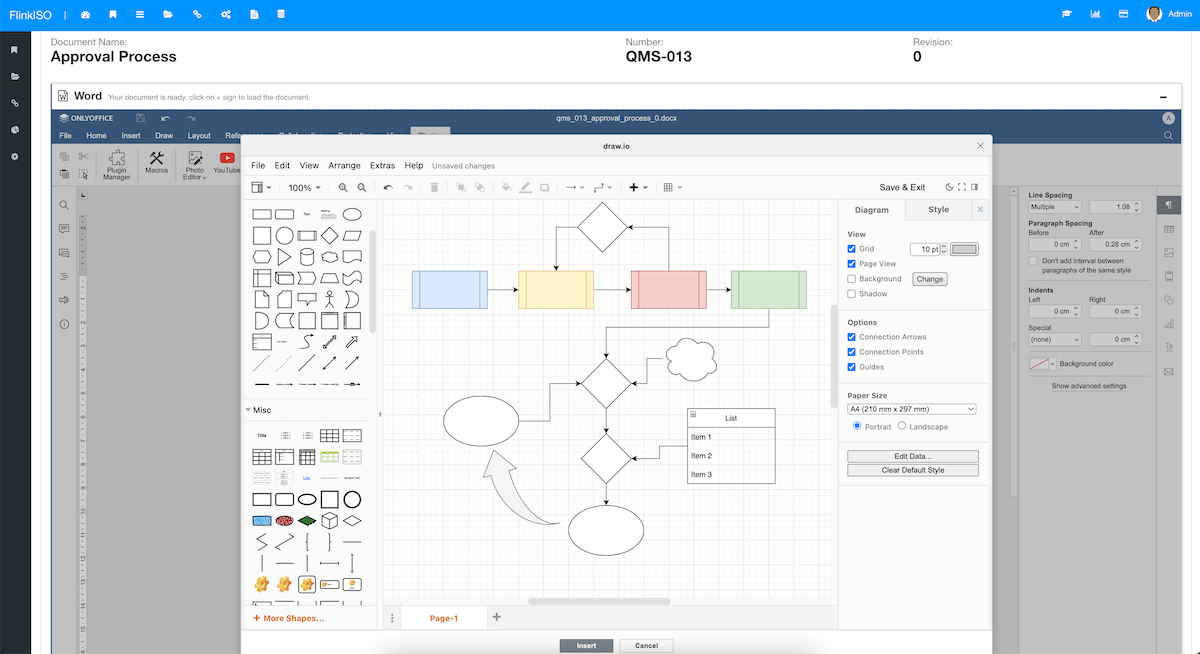
Process document would often have flowcharts. With ONLYOFFICE Document Editor, while you create a document from within the FlinkISO system, you can draw these flow charts with the help of draw.io plug in available in ONLYOFFICE Document Editor. Click on Plugins and then click on draw.io icon. This will open a flowchart/ process drawing canvas. Draw your processes, flowchart and click insert. Your drawing will be inserted in a document. Once ready, you can save the document.
When you save the document, system will convert this document in HTML format and also fetch all the process/ flowchart drawings in png format. On a process page, you system will display these drawing and process details earlier converted in HTML format. If added, system will also display all the input-output processes linked together on a Process view page.
Once you are ready with these, you can proceed to link these with the Custom HTML forms what you have created. You can link process or processes to a form by selecting them from the dropdown available and once added, you can also define the sequence of those processes.
After this, whenever user opens the HTML form, system will fetch the linked process/ processes sequentially and will display processes details, input-output processes and any available flowchart etc at the bottom of each form for user's ready reference.
More from FlinkISO
In their own words
Testimonials
We’ve been using FlinkISO for about a year, and it has become a key tool for managing our QMS for ISO 9001 and ISO 27001.
The platform is powerful yet straightforward—easy to navigate, quick to understand, and practical for day-to-day work. The team support is also excellent: fast, responsive, and genuinely helpful whenever we need it.
Overall, it’s a highly reliable solution and, in our experience, one of the best QMS tools available today.
The FlinkISO Online System certainly has revolutionized our business, it certainly allows us to work "smarter, not harder".
The online tracker, database, reports and graphs etc, have outperformed our initial system.
All the documentation is accessible at the press of a button, needless to say we are proud to be affiliated with you and with this level of professionalism.
We have been using FlinkISO as our Quality Management Software for the past few years and we are extremely satisfied with the software and services offered.
The support team installed the software for us and worked with us to customize our Quality Management website which made the transition from a paper-based system to an online one effortless.
They always respond promptly to any questions or inquiries and have processed our web customization requests with speed and reliability.
I would highly recommend their services.







Start your 15 days On-Cloud QMS trial. No payment required. One free training session included. Live chat & email support.
RegisterDownload Free Quality Management Software On-Premise Edition. Installation, Training, Support Services on-demand.
Free Download