Application URL
Start with the HTTPS address of the FlinkISO instance serving the generated module.
FlinkISO · Free Open Source QMS
Retrieve structured Custom Form records through endpoints generated with your module
Structured access to QMS records
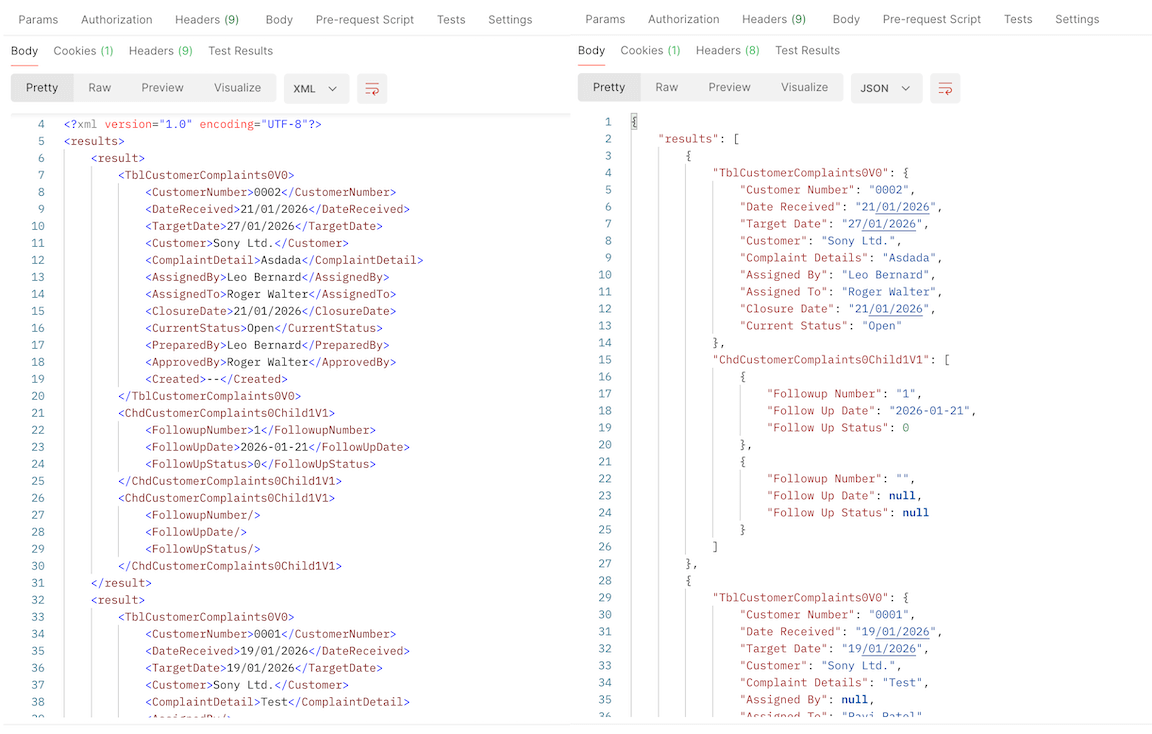
When FlinkISO generates a Custom HTML Form, it also creates JSON and XML export actions for that module. An authorised integration can request records using the generated table route and Custom Table ID.
Request anatomy
Start with the HTTPS address of the FlinkISO instance serving the generated module.
Use the route generated for the Custom Form controller.
Select the generated json or xml action.
Pass the form’s UUID as the named custom_table_id parameter.
Example request
Replace the placeholders with the application URL, generated table route, format and Custom Table ID from your own instance.
GET /<table-route>/<json-or-xml>/
  custom_table_id:<uuid> HTTP/1.1
Host: <application-host>
user: <admin-username>
password: <admin-password>curl --location \
'https://<application-host>/<table-route>/json/
custom_table_id:<uuid>' \
--header 'user: <admin-username>' \
--header 'password: <admin-password>'Use HTTPS, keep credentials outside source code and logs, and limit access to the systems that need the export. The generated endpoints require an administrator account under the current export authentication model.
Choose the format
Use JSON with browser applications, JavaScript, mobile clients, automation tools and services that work naturally with arrays and objects.
Use XML with document-oriented integrations, established enterprise interfaces and tools that consume named XML elements.
More from FlinkISO
Assisted implementation
We will setup the application for you. Our team will actively work with you during the process, help you build your Custom HTML forms, and show you how to use the system efficiently.
Explore Startup PlanStart your 15 days On-Cloud QMS trial. No payment required. One free training session included. Live chat & email support.
RegisterDownload Free Quality Management Software On-Premise Edition. Installation, Training, Support Services on-demand.
Free Download