In FlinkISO QMS you can handle roles & user access at multiple layers. At top you can divide users as following:
| Role | Description |
|---|---|
| Admin |
|
| Approvers |
|
| HODs |
|
| Users |
|
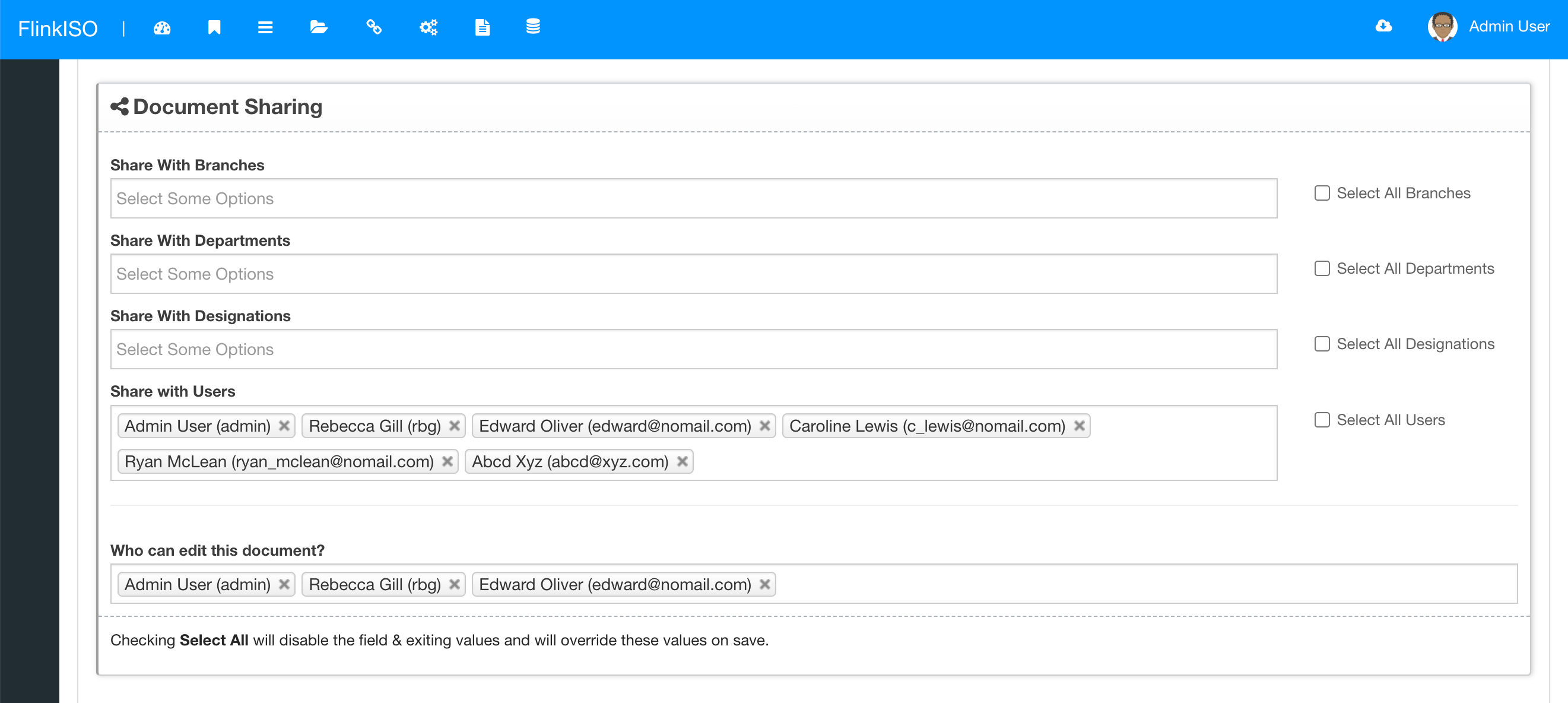
At 2nd layer of user access, document access to each and every user can be defined from the Document's add/ edit page. Under document's add/ edit page, you can define access to the users based of their branches, departments, designations or individual users. E.g. If the document is shared with "A" branch and "B" department, everyone from branch "A" and department "B" will be able to "View" that document. However, none of these uses will be able to Edit the document. You specifically have to define the Editors, (including the document creator) as editors. Only then a user will be able to edit the document.
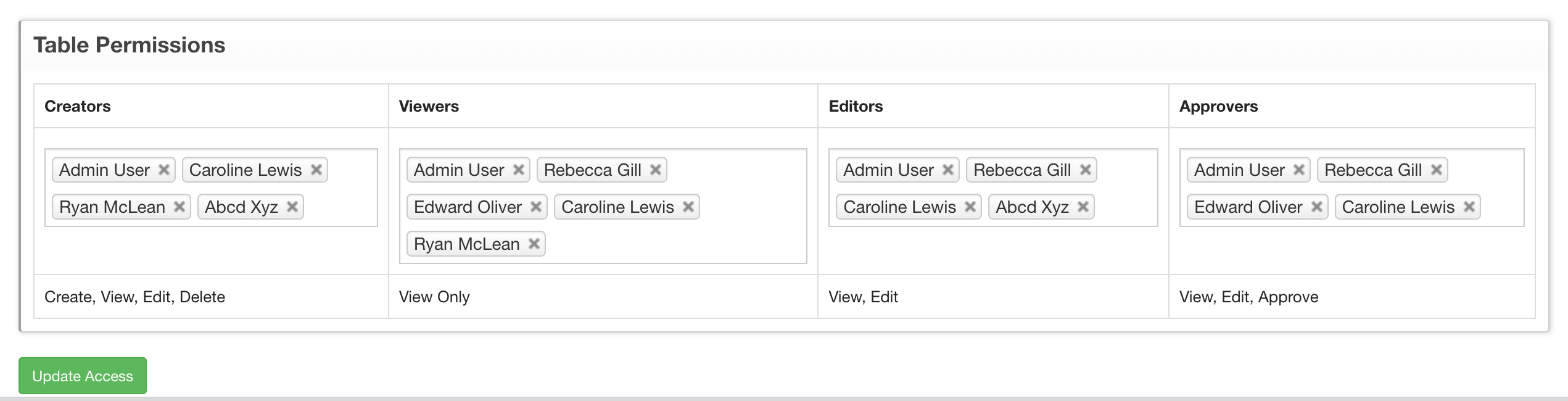
At 3rd layer, you can define who can access each Custom HTML Form that you create using FlinkISO APIs. By default, all custom HTML Forms are derived from the document and hence they automatically inherit the access from the QMS Document for which the custom Form is created. E.g. If you have a Customer Complaint Document which has access to branch "A" and if you create a custom HTML Table for the Customer Complaint document, then everyone from branch "A" will have access to this table. However, you override these access control from the custom HTML Table's View page and define following:
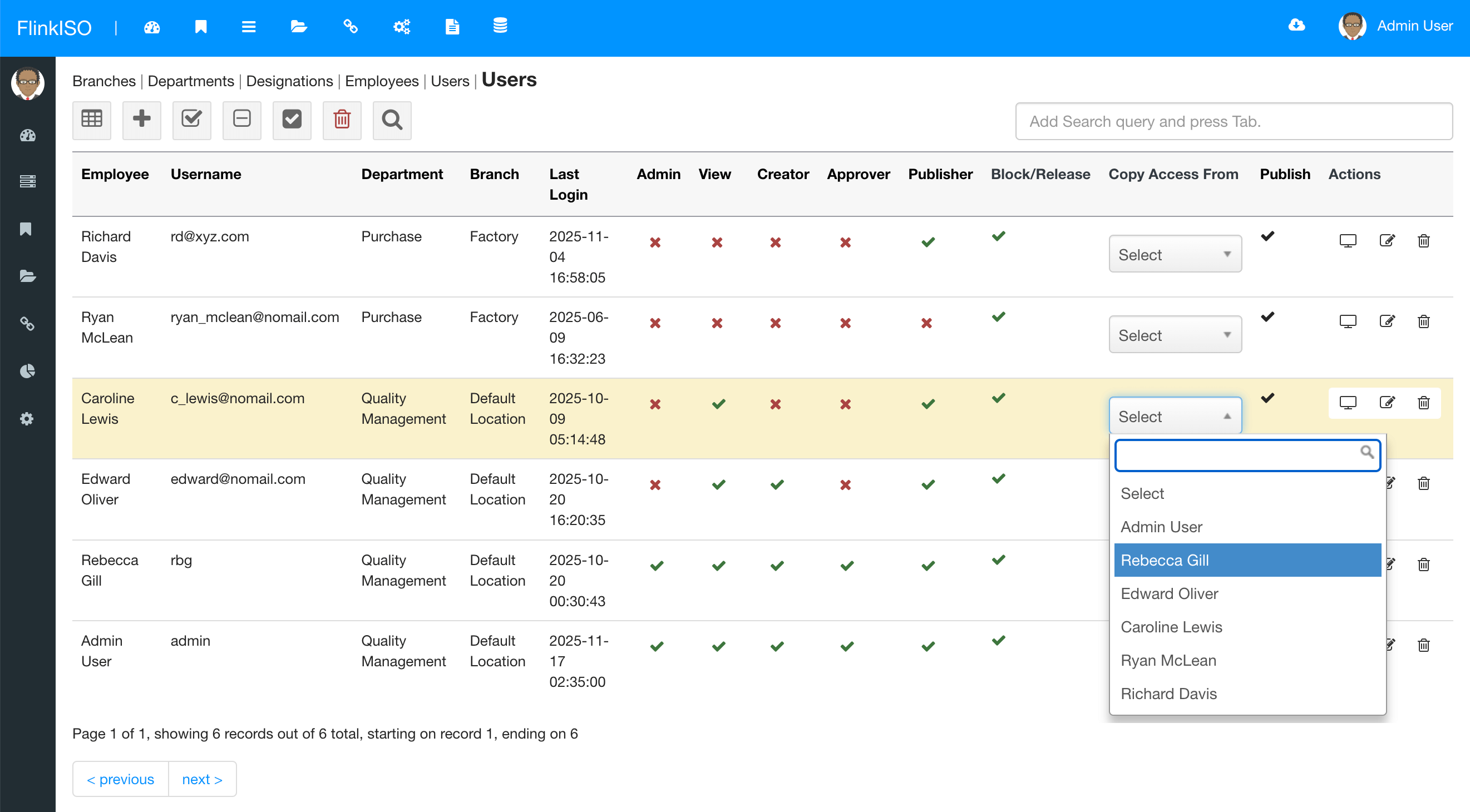
It is now made easy to re-define Document/ Custom HTML Table access for a single user without going through each and every document/ table. You can goto User's View page and system will display all the available documents & Custom HTML Forms. You can then check/ uncheck the access for each document/ Custom HTML Form. This feature is very useful when you add a new user post QMS setup. Note that if a Document is shared with entire branch/ department/ designation, then it will be automatically be shared with a user and check mark will be grayed out.
If you are creating an identical users, where the permissions/ access for new user is same (or almost same) as a user you have already created in past, then you can just copy all the access as it is from the existing user to new user by selecting the existing user from the drop-down. This will add all the access to QMS Documents/ Custom HTML Forms form the existing to new user. You can then additionally change other options (like creator/ viewer etc) from the index page by clicking on the check/ cross icons.
Note that user may have to logout/ login again for some of these changes to take effect.
With ONLYOFFICE™ Editors, you have complete control on your documents without loosing any formatting unlike online web-based HTML editors.
Each and Every QMS document created/ uploaded in the QMS is Version Controlled and Access Controlled and follows all the Document Management best practices.
Add password to secure your PDFs while you download them. System records every downloads with issue number & timestamps along with user details.
HTML forms created are automatically version controlled, ready with required validations as well as design/ layout you choose while creating these HTML forms.
Each of these forms are either linked with the QMS document and by default inherit access restrictions based on document access.
Every form created, by default follows system's approval system. Users with limited roles, cannot publish any record in the system unless that record/ document is approved by HoDs or Administrators.
With ONLYOFFICE™ Editors, you can preserve all your formulas and sheets in your spreadsheets.
Simply upload the existing documents/ spreadsheets/ presentations to create the document or spreadsheet.
You can easily create spreadsheets, documents, formats etc and share with users within the system for scheduled data entry, eliminating efforts of printing and distributing these documents manually.
Users can open these shared documents from within the system, add their data and save them onto the system without any need to download/ upload. All data is stored in a singled location and can be accessed secuerly.
To store this data in SQL format instead of Document format, you are free to build HTML forms within the system by using our Drag-and-Drop feature.
Digitally sign all your QMS document while downloading them in PDF format. You can draw your signature or upload existing signature to the system.
The FlinkISO Online System certainly has revolutionized our business, it certainly allows us to work "smarter, not harder".
The online tracker, database, reports and graphs etc, have outperformed our initial system.
All the documentation is accessible at the press of a button, needless to say we are proud to be affiliated with you and with this level of professionalism.
Mrs. V. Donjeany
LEPRO Corporation CC, South Africa.
We have been using FlinkISO as our Quality Management Software for the past few years and we are extremely satisfied with the software and services offered.
The support team installed the software for us and worked with us to customize our Quality Management website which made the transition from a paper-based system to an online one effortless.
They always respond promptly to any questions or inquiries and have processed our web customization requests with speed and reliability.
I would highly recommend their services.
Priyangi Perera
Pro-Lab Diagnostics, Round Rock, Texas.
Start your 45 days On-Cloud QMS trial. No payment required. One free training session included. Live chat & email support.
RegisterDownload Free Quality Management Software On-Premise Edition. Installation, Training, Support Services on-demand.
Free Download