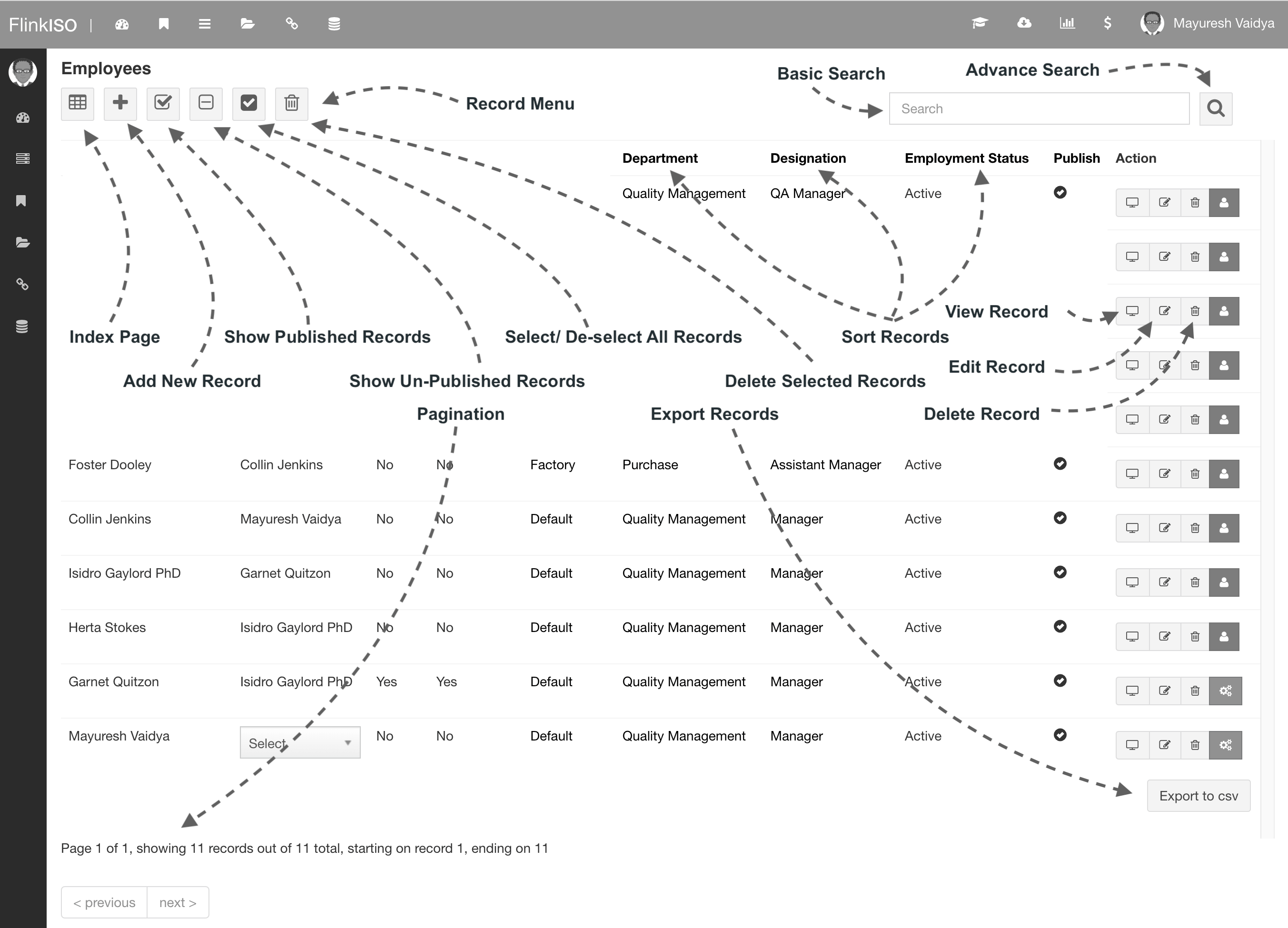
FlinkISO brings controlled documents, quality records, approvals, tasks and reports into one connected application. Administrators define the structure and access; users work with the records and actions shared with them.
Recommended setup order
- Install and register the application. Use the installer for a new supported server, or follow the manual path for an existing environment.
- Add organisation masters. Create locations or branches, departments, designations and employee records.
- Create users and access. Turn employee records into login accounts, assign roles and restrict document or table access.
- Add standards, clauses and document categories. These records provide the structure used when documents and forms are created.
- Add controlled documents. Upload a file or create one from a template, then configure sharing, collaboration and approvals.
- Build or install forms and modules. Use the Form Creation API to define fields, child relationships, tabs and table behavior.
How records connect
A document can be linked to a standard and clause, a category, a process and a custom HTML form. Repeatable details belong in Child Forms. A separate controlled record that has its own document and form belongs in Child Document Forms. This distinction keeps reports and approval histories attached to the correct record.
What users see each day
After login, users land on the dashboard. It shows forms shared with them, records due by schedule and shortcuts to the main application areas. Index pages provide add, view, edit, search, sort, report and export actions according to the user’s permissions.