Measurement System Analysis
Use this record to decide whether a measurement system is suitable for the specific process decision it supports.
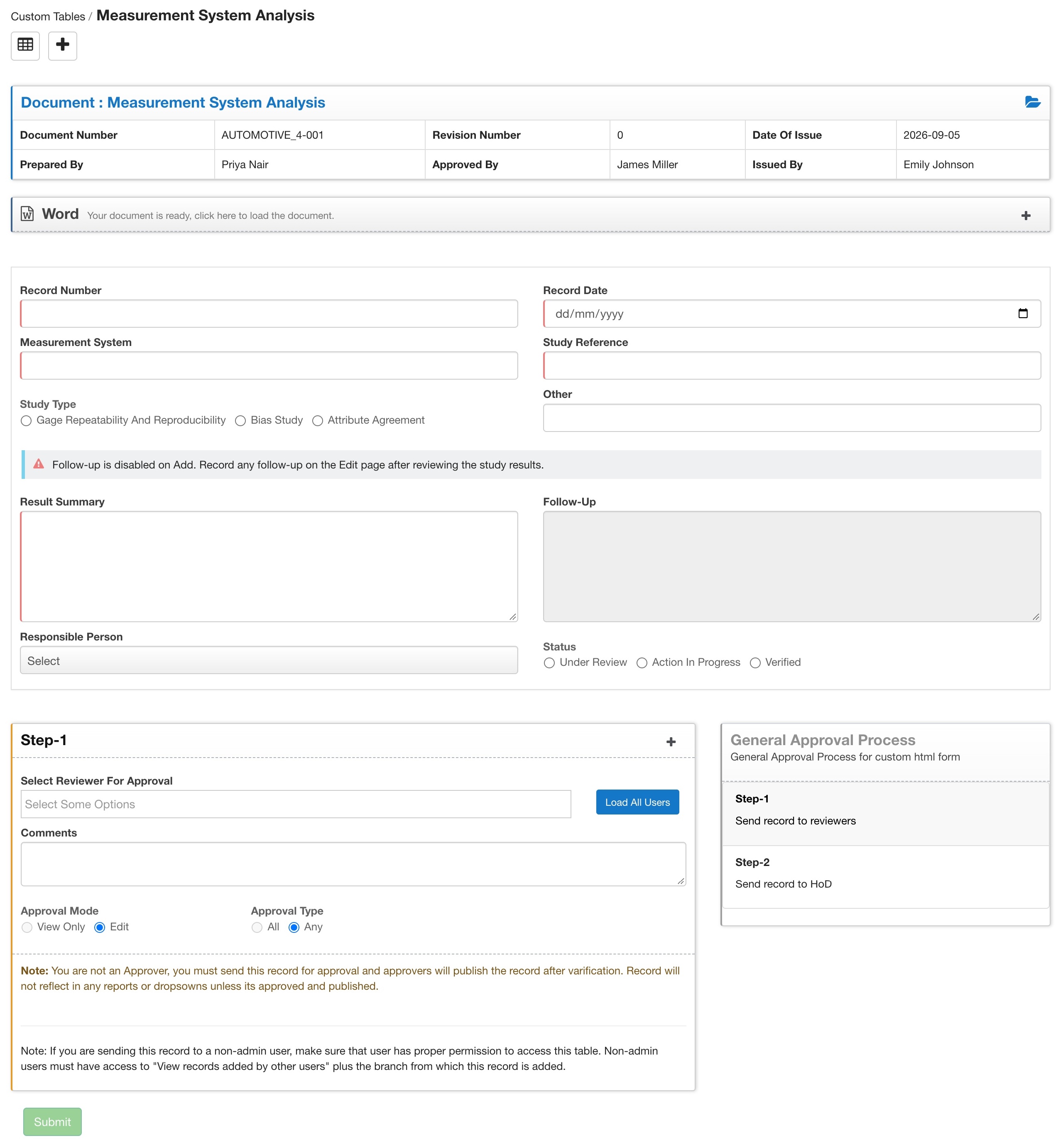
Workflow
- Establish the system and study. Identify the Measurement System in enough detail to distinguish the device, fixture or method. Enter the Study Reference and Study Type from the controlled study report.
- Summarise the result in context. Record the Result Summary with the study outcome and its acceptance basis. Note limits of the study, such as a measurement range or operator set that differs from intended production use.
- Track follow-up. Use Follow-up to document what will change if the system is unsuitable and whether another study is needed. Assign the Responsible Person and update Status following review.
Do more
Use or configure these features in your installed FlinkISO application, according to your permissions. You can also re-create forms using the FlinkISO Form Builder to change labels, add or remove fields, rearrange or resize them, set default values, mark fields as required, and link fields to other records.
Configure email triggers
Send emails when a record is created or edited. Trigger an email when a radio field changes to a selected value. Schedule reminders against a date field.
Read MoreCreate and assign tasks automatically
In Create Tasks, choose the employee or user field for the assignee, a radio field and value for the condition, and a date field for the due date.
Read MoreDefine an approval process and steps
Set the review steps and approvers, then assign the approval process to this form.
Read MoreExport a record as PDF
Open a saved record and choose Download PDF to export a digitally signed, password-protected copy.
Read MoreCreate a custom PDF template
Choose which form fields appear in the PDF and how they’re laid out.
Read MoreExport form data
Export records for analysis outside FlinkISO.
Read MoreReview record history
Review record changes and approvals in the audit trail.
Read MoreConfigure tabs and linked forms
Arrange fields into tabs and make linked forms available in context.
Read MoreSet field editing rules
Control who can edit individual fields and apply approval-step rules where needed.
Read More
Standards and clauses
- IATF 16949:2016 · Clause 7.1.5.1.1